bd / Dolt Troubleshooter

bd (beads) stores issues in a Dolt database under .beads/ and exports them to
.beads/issues.jsonl (the file committed to git). Most operational failures come
from a mismatch between four layers:
- Engine mode — embedded (in-process) or server (external
dolt sql-server). Mode controls which data directory is used and which database name constraints apply. Everything else depends on this being correct. Check withbd dolt show. - Dolt server — the live database (
.beads/dolt/in server mode,.beads/embeddeddolt/in embedded mode) - JSONL export —
.beads/issues.jsonl(git source of truth) - Auto-backup —
.beads/backup/(a local Dolt backup target)
The Signature Failure: Writes Silently Revert
Symptom: You run bd close X or bd update X, bd prints success, but the
change is gone on the next command. bd show X and .beads/issues.jsonl
disagree, or both revert to the old state.
Tell-tale log line (in .beads/dolt-server.log):
auto-backup failed: sync to backup: sync backup backup_export:Error 1105 (HY000): error opening table file: table file not found:.beads/backup/<hash>Root-cause chain
- The
.beads/backup/Dolt backup is corrupt — itsmanifestreferences table files that no longer exist on disk. - On every invocation bd auto-imports
issues.jsonlinto a working DB ("auto-importing into empty database"). - After a write, bd tries to export to
issues.jsonland sync to backup. The backup sync fails, and the export does not land. - The next bd command auto-imports the now-stale
issues.jsonl, which reverts the previous write before applying the new one.
The result is a write-rollback loop where only one change "sticks" at a time and even that is unreliable.
Why it recurs across clones
If .beads/backup/ was ever committed to git (despite being listed in
.beads/.gitignore), the corruption travels with the repo. Git honors tracking
over .gitignore, so a file added before the ignore rule stays tracked.
The Hook-Timeout Stash-Wipe (untracked files vanish after a commit)
Symptom: Untracked files (drafts, new posts, uncommitted work) disappear from the
working tree after a git commit. git stash list shows a new stash with message
WIP on <branch>: <hash> <msg>. The untracked files are in stash@{0}^3.
Root-cause chain:
- bd's git hooks (pre-commit, post-commit, etc.) run
bd hooks run …on every commit. - bd's sync does a
git stash -u(includes untracked files) to get a clean tree for Dolt ref work. - The hook runs under a
timeout(default 30s). If Dolt sync takes longer, the timeout fires, the hook prints "continuing without beads" and exits — without popping the stash. - The working tree stays at the stashed state: untracked files are gone, tracked files are reverted to HEAD.
Identify: Check whether the stash was bd-caused (has an untracked section):
git stash list # look for unexpected stash@{0}git ls-tree -r --name-only stash@{0}^3 2>/dev/null # non-empty = -u stash, likely bdImmediate recovery: restore untracked files from the stash without disturbing anything committed since:
# Restore individual files from the untracked tree (stash@{0}^3)git show stash@{0}^3:<path/to/file> > <path/to/file># Or restore all untracked files at once (safe if working tree is clean):git checkout stash@{0}^3 -- .# Then drop the stash once everything is confirmed on disk and committed:git stash drop stash@{0}Permanent fixes (apply both):
Fix 1 — Raise the hook timeout in your shell profile so the stash-and-pop completes before the timeout bails:
# ~/.zshrc or ~/.bashrcexport BEADS_HOOK_TIMEOUT=120 # was 30; 2 min covers slow Dolt syncFix 2 — In repos where beads is unused (no issues, no issues.jsonl, no remote),
disable the hooks entirely — they add no value and carry real risk:
cd .git/hooksfor h in pre-commit post-commit post-checkout post-merge pre-push prepare-commit-msg; do [ -f "$h" ] && mv "$h" "$h.disabled"doneDetect an unused beads repo: bd dolt show shows embedded mode with no remote, and
bd list returns "No issues found" with no issues.jsonl on disk.
Reverse: for h in *.disabled; do mv "$h" "${h%.disabled}"; done
Check all repos for bd-caused orphaned stashes:
for dir in $(find ~/projects -maxdepth 1 -type d); do [ -d "$dir/.git" ] || continue stash=$(git -C "$dir" stash list 2>/dev/null) [ -z "$stash" ] && continue # Check for untracked section (^3) which indicates a -u stash while IFS= read -r entry; do ref=$(echo "$entry" | grep -o 'stash@{[0-9]*}') has_untracked=$(git -C "$dir" ls-tree -r --name-only "$ref^3" 2>/dev/null) [ -n "$has_untracked" ] && echo "bd-stash candidate: $dir $entry" done <<< "$stash"doneThe Orphaned dolt sql-server Process Leak
Symptom: ps aux | grep "dolt sql-server" shows multiple processes (each
80–160 MB RAM) on different ports. Memory usage grows across the day.
Root cause: Each beads repo in server mode spawns a dolt sql-server instance.
If the bd daemon exits uncleanly (timeout, SIGKILL, machine sleep) without sending
SIGTERM to its server, the process is orphaned. Repeated bd invocations across many
repos accumulate leaked servers.
Identify and reap:
# Countpgrep -c -f "dolt sql-server"
# Reap gracefully (SIGTERM allows Dolt to flush)pkill -TERM -f "dolt sql-server"sleep 3pgrep -c -f "dolt sql-server"   # should be 0; if not, use SIGKILL
Servers restart automatically on the next bd command in each repo. No data is lost
from a clean SIGTERM.
Schema Version Skew
When bd database migrations occur across multi-agent environments or version upgrades, schema skew can block database operations or cause writes to fail.
See references/schema-version-skew.md for detailed troubleshooting and recovery runbooks covering:
- Remote-Backed Database Migration Blocks (client ahead of DB, auto-migrations refused on remote clones)
- Client Behind the Database (database migrated forward, older client writes fail)
- DB Migrated by Unreleased Build (development build migration with no newer release available)
Diagnostic Architecture & Execution Flow
┌────────────────────────────────────────────────────────┐│ Phase 3: Application Health & Issues (bd doctor) │ ← FAILS/HANGS if Phase 1 or 0 is broken├────────────────────────────────────────────────────────┤│ Phase 2: Database Protocol & Schema (bd migrate) │├────────────────────────────────────────────────────────┤│ Phase 1: OS Process & Lock Layer (.beads/dolt-server) │ ← Single exclusive file lock├────────────────────────────────────────────────────────┤│ Phase 0: Binary & PATH Resolution (PATH, CGO, ICU) │ ← Determines which binary executes└────────────────────────────────────────────────────────┘Why
bd doctoris NOT the first step:bd doctoris a high-level tool that attempts to initialize an in-memory client or connect to the running Dolt server. If an orphaneddolt sql-serverprocess holds the exclusive file lock on.beads/dolt/,bd doctorblocks indefinitely on startup without printing errors. Similarly, if multiplebdbinaries shadow your PATH,bd doctormay execute an outdated pure-Go binary and report spurious errors.
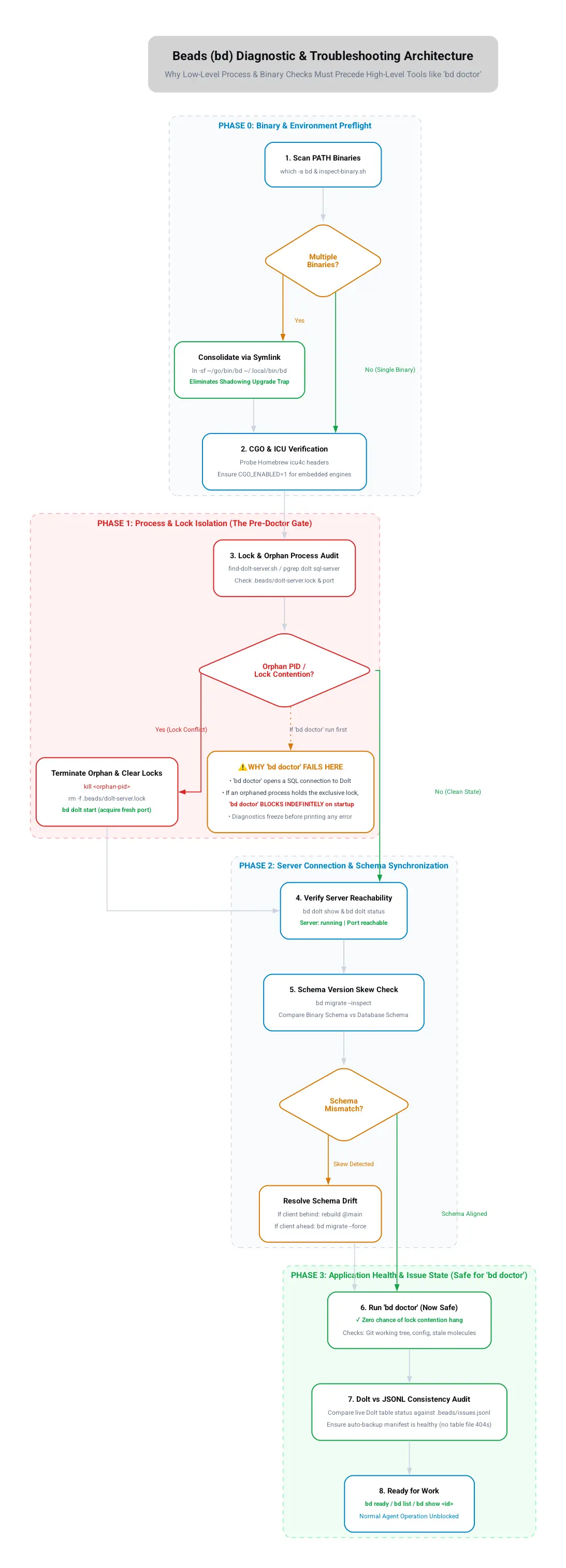
Quick Diagnosis
Start here — four commands in order:
# 0. Check for orphaned servers or lock contention first (prevents hanging)scripts/find-dolt-server.sh
# 1. Read cached daemon failure if presentcat .beads/daemon-error 2>/dev/null
# 2. Reveal engine mode, data directory, and server connection statusbd dolt show
# 3. Check schema version and pending migrationsbd migrate --inspect
# 4. Now safely run doctor (lock and binary preflights cleared)bd doctor
Then run the bundled diagnostic for deeper checks (read-only, safe):
scripts/diagnose.shIt checks, in order:
- Engine mode and whether a
daemon-errorfile is present - Schema version skew warnings and whether duplicate
bdbinaries shadow your PATH - Dolt server status and recent backup errors in the log
- Whether
.beads/backup/ordolt-server.*runtime files are git-tracked (they should not be) - Whether
bd show(Dolt) agrees with.beads/issues.jsonlfor a sample issue - Whether the backup
manifestreferences missing table files
To inspect git commit revision hashes across all installed bd client binaries:
scripts/inspect-binary.shRepair
Run the repair (makes changes — review first, commit after):
scripts/repair-corrupt-backup.shWhat it does:
bd dolt stop- Moves the corrupt
.beads/backup/aside to.beads/backup.corrupt.<ts>/ bd dolt start(bd recreates a fresh, valid backup)git rm --cachedany tracked.beads/backup/*anddolt-server.*files so.gitignorefinally takes effect- Deletes the moved-aside corrupt copy
- Forces a clean export:
bd export -o .beads/issues.jsonl
After repair, verify before committing (see below), then:
git add .beads/issues.jsonlgit commit -m "chore(bd): untrack corrupt dolt backup; resync issues.jsonl"The Golden Rules
- JSONL is the source of truth for git. After any batch of bd writes, run
bd export -o .beads/issues.jsonland diff it before committing. - Never commit
.beads/backup/or.beads/dolt-server.*. They are machine-local. If they show ingit ls-files, untrack them. - Verify, don't trust, the success message. bd printing "Closed X" is not
proof of persistence during a corruption episode. Re-read with
bd show Xand grep the JSONL. - Batch writes, then one export. Because each command re-imports JSONL,
apply all mutations, confirm Dolt state with
bd show, then export once. - Commit before bd operations. Untracked files are the most vulnerable to the hook-timeout stash-wipe. If a file matters, commit it before running anything that triggers a git hook.
- Set
BEADS_HOOK_TIMEOUT=120in your shell profile. The 30s default is too short for Dolt sync on slow or cold connections and causes orphaned stashes. - Disable hooks in repos where beads is unused. An empty beads repo (no
issues, no JSONL, no remote) with active hooks is a net liability. Detect with
bd listandbd dolt show; disable as shown above. bd --versionlies when the binary is a dev build. A binary built from local source shows the same version string as the published tag it was branched from, but may be many commits — and schema migrations — ahead.(dev)in the output is a red flag. Always verify withgo version -m "$(which bd)"and compare themodpseudo-version hash across all machines sharing a database.- "Upgrade to latest" assumes a newer release exists — verify first. Before
prescribing
go install …@latestfor a schema-skew fix, rungo list -m -versions github.com/steveyegge/beadsand compare against the installed tag. If you're already on the latest tag and the DB is still ahead, the DB was migrated by an unreleased/mainbuild — you need that specific commit (go install …@<commit>), not a repeat of the same tag. - A repo-fingerprint mismatch after adding a remote late is expected, not
corruption.
bd initcomputesrepo_idfromgit config remote.origin.urlwhen available, falling back tosha256(realpath(repo_root))when no remote is configured yet. If youbd initbefore runninggit remote add origin, the stored fingerprint is path-based; once a remote exists,bd doctor's live check recomputes a URL-based fingerprint and the two will never match. Fix withecho y | bd migrate --update-repo-id(only if you're sure no other clone depends on the old ID) rather thanrm -rf .beads && bd init. - Use non-interactive flags when repairing in autonomous/agent environments.
Interactive prompts will time out or cancel in non-interactive agent sessions:
bd doctor --fix --yes(auto-applies all fixable doctor issues)echo y | bd migrate --update-repo-id(bypasses interactive confirmation for repo ID updates)bd migrate --force/BD_ALLOW_REMOTE_MIGRATE=1 bd migrate(overrides remote schema gate on designated migrator)
- Resolve "Dolt Remote vs Git Origin" endpoint conflicts using config.
When
bd doctorwarns that a Dolt remote shares the same URL as git origin, runbd config set dolt.local-only trueor remove the conflicting Dolt remote (bd dolt remote remove origin).
Manual Verification Snippet
Confirm Dolt and JSONL agree for specific issues:
for id in a2ac-d9l a2ac-aqj; do dolt=$(bd show "$id" --json 2>/dev/null \ | python3 -c "import json,sys;d=json.load(sys.stdin);i=d[0] if isinstance(d,list) else d;print(i['status'])") jsonl=$(python3 -c "import jsonfor l in open('.beads/issues.jsonl'): if l.strip(): i=json.loads(l) if i['id']=='$id': print(i['status'])") echo "$id dolt=$dolt jsonl=$jsonl $([ "$dolt" = "$jsonl" ] && echo OK || echo MISMATCH)"doneLock Contention: Multiple dolt sql-server Processes
Symptom: bd dolt start reports server started (PID N) but not accepting connections … timeout, and .beads/dolt-server.log repeats database "dolt" is locked by another dolt process. Dolt allows only one server per data
directory (a single exclusive write lock). This happens when many projects each
run a server, or a bind-mounted .beads/ is shared by a host + container.
Never blanket-kill dolt sql-server — you'd disrupt other projects. Isolate
the server bound to this repo by its working directory:
scripts/find-dolt-server.sh # lists all servers with PID + CWD; marks THIS repo'sThen stop only that one (bd dolt stop from the repo root is scoped to this
project), clear stale runtime files, and start the single owner. Full steps:
references/recovery-playbook.md → Case F. For the bind-mount host/container
variant, one machine owns the server and the other stays Dolt-free — see the
project AGENTS.md.
Related References
references/schema-version-skew.md— detailed runbooks for schema version skew (remote migration blocks, client behind DB, unreleased builds)references/symptoms.md— symptom → cause → fix lookup tablereferences/recovery-playbook.md— step-by-step recovery for harder cases (lost writes, divergent Dolt vs JSONL, restoring frombd backup, and multi-server lock contention in Case F)references/cgo-and-schema-drift.md— detailed runbook on CGO ICU dependencies, pure-Go degraded test warnings, multi-agent@mainschema drift, and cross-platform compilationscripts/diagnose.sh— read-only (or--probefor write test): primary health check for engine mode, schema skew, repo fingerprint, PATH shadowing, backup corruption, and Dolt/JSONL agreementscripts/repair.sh— unified automated repair: creates a raw snapshot backup, clears corrupt backup files, applies schema migrations (--force), updates repo fingerprints, untracks local files, runsbd doctor --fix --yes, and exports clean JSONLscripts/repair-corrupt-backup.sh— targeted repair for corrupt backup write-rollback loopsscripts/restore-bd.sh— utility to rebuildbdagainst@mainwith full CGO/ICU support, disk-space preflight checks, optional automated schema migration (--migrate), and automatic synchronization of shadowed PATH binaries across macOS and Linuxscripts/find-dolt-server.sh— read-only: list alldolt sql-serverPIDs with their working dirs and flag the one owning the current repo's.beads/scripts/inspect-binary.sh— read-only: scan PATH for installedbdbinaries, extract Go build metadata (pseudo-versions, timestamps, git commits), and detect PATH shadowingassets/process-flow.webp/assets/process-flow.dot— architectural diagram and diagnostic phase execution flowchart (Light Theme)