Mizan User Guide
This guide covers what Mizan can actually do today: manage a local metric
registry, configure credentials/project settings, and run evaluations —
single (pointwise), compare (pairwise), rubric, and custom_schema, including
multimodal (image/audio/video/music) assets — against the live Vertex AI Gen AI
Evaluation Service, plus heuristic non-LLM checks that run deterministically
with no credentials and no network. All five metric kinds and multimodal are
implemented and CLI-runnable end-to-end. Every command and output shown below was run against
the built CLI; where a capability isn’t implemented yet, this guide says so
explicitly rather than implying it works. For deeper, copy-pasteable recipes
for every metric kind (including live error output for the compare/pairwise
placeholder contract and the create-time rubric/schema validation), see
docs/testing-guide.md.
For the underlying design, see architecture-final.md.
For capabilities that are planned but not built, see
roadmap.md.
Prerequisites
Section titled “Prerequisites”-
Go 1.26+ — only required if you’re building from source.
go install(below) handles the toolchain for you. -
A GCP project with the Vertex AI API enabled.
-
Application Default Credentials (ADC) configured, e.g.:
Terminal window gcloud auth application-default login(or a service account / workload identity if running in a deployed context — there is no API-key auth path.)
-
IAM permission to call Vertex AI — the
Vertex AI Userrole (or equivalent) on the project you configure.
Install
Section titled “Install”go install github.com/ghchinoy/mizan/cmd/mizan@mainMizan uses the pure-Go modernc.org/sqlite driver for its local registry
store, so this install is cgo-free — no C toolchain required, even though
the registry is backed by SQLite.
Configure
Section titled “Configure”Set your project:
mizan config set project-id <your-project-id>Optionally set the region (default is us-central1):
mizan config set location us-central1The multi-region value
usis not valid for the native eval path and will 404 — always use a concrete region such asus-central1.
Check the resolved configuration (mizan config list is an alias for
mizan config show):
$ mizan config showKEY VALUE SOURCEproject-id my-project env-filelocation us-central1 defaultstaging-bucket (unset) defaultapi-endpoint (unset) defaultregistry-db /home/you/.config/mizan/registry.db defaultpack-cache /home/you/.cache/mizan/packs defaulttemplates-repo github.com/ghchinoy/mizan-templates defaultdefault-model gemini-2.5-flash (built-in) defaultauthor-name (unset) defaultdefault-license (unset) defaultEach row is labelled by the exact config set key, so what config show
prints round-trips directly into config set <key> <value> — no need to consult
config set --help to discover the key names. The SOURCE column shows where
each value came from:
| Source | Meaning |
|---|---|
env |
an exported environment variable (wins over everything) |
env-file |
the persisted <UserConfigDir>/mizan/.env |
default |
the built-in default (or unset, for values with none) |
config show works fine with no project ID set (it prints (unset)) — only
eval run hard-requires a project ID. registry and config commands work
without one.
mizan config set persists values to <UserConfigDir>/mizan/.env (e.g.
~/.config/mizan/.env on Linux), created with restrictive permissions
(chmod 0600 on the file, 0700 on the directory). Valid keys: api-endpoint,
author-name, default-license, default-model, location, pack-cache,
project-id, registry-db, staging-bucket, templates-repo.
The author-name and default-license keys are authoring conveniences:
registry create falls back to them when you omit --author / --license, so
you can set your identity once and have every new template you author carry it
(an explicit flag always wins over the configured value — see the Registry
walkthrough).
You can also configure via environment variables instead of (or in addition
to) the persisted file — real environment variables always win over the
.env file:
| Config value | Env var(s) |
|---|---|
| Project ID | MIZAN_PROJECT_ID or PROJECT_ID |
| Location | MIZAN_LOCATION |
| Staging bucket | MIZAN_STAGING_BUCKET |
| API endpoint | MIZAN_API_ENDPOINT |
| Registry DB path | MIZAN_REGISTRY_DB |
| Pack cache dir | MIZAN_PACK_CACHE |
| Templates repo | MIZAN_TEMPLATES_REPO |
| Default model | MIZAN_DEFAULT_MODEL |
| Author name | MIZAN_AUTHOR_NAME |
| Default license | MIZAN_DEFAULT_LICENSE |
You can also point Mizan at an explicit env file with MIZAN_ENV_FILE.
Unknown-variable warning: if you export a MIZAN_* variable Mizan does not
recognize — for example the easy-to-mistype MIZAN_PROJECT instead of
MIZAN_PROJECT_ID — Mizan prints a warning to stderr and ignores the value
rather than silently dropping it:
mizan: warning: ignoring unknown env var MIZAN_PROJECT (did you mean MIZAN_PROJECT_ID?)Combined with the SOURCE column in config show (and the src= hints in the
eval pre-flight line), this makes it obvious when a value came from a place you
did not expect. Note that a mistyped variable is ignored, not applied — use the
exact name from the table above.
Per-invocation --project flag: mizan eval accepts a --project flag that
overrides the GCP project for a single run, without touching your persisted .env
or exported environment. It is available on both eval run and eval pairwise:
mizan eval run --project other-project --metric demo/conciseness --field response="…"mizan eval pairwise --project other-project --metric demo/pref --baseline a=… --candidate b=…The flag sits at the top of the project precedence chain:
--project flag > exported MIZAN_PROJECT_ID / PROJECT_ID > .env file > (default: unset → error)When you pass --project, the pre-flight echo attributes the project to the flag
so it is obvious the override took effect:
mizan: autorater → project=other-project (src=flag) location=us-central1 (src=default) model=gemini-2.5-flash (path=native)Omitting --project leaves the environment/.env precedence above completely
unchanged. (Exporting MIZAN_PROJECT_ID=other-project mizan eval run … for one
command still works too — the flag is simply a clearer, per-command equivalent.)
The --project value is validated locally against the GCP project-id format
(6–30 characters, a lowercase letter first, then lowercase letters, digits or
-, no trailing -), so a typo fails fast with a crisp error instead of an
opaque server-side InvalidArgument.
Security note: Mizan refuses a custom --api-endpoint / MIZAN_API_ENDPOINT
whose host isn’t *.googleapis.com, because the Vertex client attaches your
ADC bearer token to every request — an arbitrary endpoint could exfiltrate it.
If you genuinely need a non-Google endpoint (e.g. a test proxy), set
MIZAN_ALLOW_CUSTOM_ENDPOINT=1 to override.
Registry walkthrough
Section titled “Registry walkthrough”The registry holds your metric templates locally (SQLite file at
RegistryDBPath). Every template has a stable id of the form
<namespace>/<slug> (e.g. demo/conciseness) — you choose both parts.
Create
Section titled “Create”$ mizan registry create --id demo/conciseness --name "Conciseness" \ --description "Scores how concise a response is" \ --kind pointwise \ --prompt "Rate how concise this response is from 0 (verbose) to 1 (concise). Response: {{response}}" \ --model gemini-2.5-flashID: demo/concisenessName: ConcisenessVersion: 0.1.0Kind: pointwiseModalities: textModel: gemini-2.5-flashSamplingCount: 4Description: Scores how concise a response isPrompt: Rate how concise this response is from 0 (verbose) to 1 (concise). Response: {{response}}Every new template starts at version 0.1.0 unless you pass --version
(the value is validated as semver; a malformed version is
rejected at create time). This is a create-time default — it is not a
configurable one, because every fresh template reasonably begins at 0.1.0.
Prompt templates use double-brace {{var}} placeholders. The check runs in
both directions before any API call, so a mis-authored template or a stray
--field fails fast with a clear error instead of silently producing a wrong
score:
- Every placeholder in the prompt must be supplied as a
--fieldwhen you run the metric (see below) — a missing value fails the run. - Conversely, every
--fieldyou supply must match a placeholder. A--fieldwhose key matches no{{placeholder}}(for example a typo, or an extra key) is rejected — otherwise its value would be silently dropped and never reach the judge. Likewise, running a template that contains no{{placeholder}}at all while supplying--fieldvalues is an error: the values cannot reach the judge, so Mizan tells you to add a{{...}}placeholder (single-brace{var}is not recognized — use{{var}}).
--kind accepts single (or pointwise), compare (or pairwise),
rubric, custom_schema, or heuristic, and all five are runnable end-to-end
today. The first four call an LLM autorater; heuristic is a non-LLM,
credential-free deterministic check (see
Heuristic (non-LLM) checks below).
single = pointwise, compare = pairwise. Pointwise and pairwise are the Vertex AI Gen AI Evaluation Service’s own terms — non-standard jargon — so Mizan also accepts the plainer spellings wherever the Vertex ones work: as
--kindvalues (single|pointwise,compare|pairwise), and as the subcommandsmizan eval single(=mizan eval run, score one response) andmizan eval compare(=mizan eval pairwise, compare two responses).rubricandcustom_schemaare the other two kinds; both are run throughmizan eval run. Whichever spelling you pass, the CLI folds it to the canonical kind, so a stored template always reportspointwise/pairwise.
Two kinds need extra authoring flags, and one has an extra structural requirement on its prompt:
single(pointwise) — no extra flags needed beyond--prompt; see Scoring a single text response below.rubric— also requires--rubric-group "name=criterion one;criterion two"(repeatable) or--rubric-groups-file <path>;createrejects the template immediately if neither is given.custom_schema— also requires--response-schema '<json>'or--response-schema-file <path>;createrejects the template immediately if neither is given.compare(pairwise) — also requires--baseline-field/--candidate-field, and the--prompttext must reference those field names as{{name}}placeholders (the run fails otherwise, since the API rejects instance keys the template doesn’t reference). Use the dedicatedmizan eval compare/mizan eval pairwise --baseline key=value --candidate key=valuecommand, which makes the baseline/candidate roles explicit (genericeval run --fieldalso technically works, since the compare fields are ordinary placeholders, but the dedicated command is the documented, less error-prone path).heuristic— a non-LLM deterministic check; requires--heuristic-typeand--heuristic-target(plus an operand for most types). See Heuristic (non-LLM) checks below.
See docs/testing-guide.md for full recipes and live
output for every kind.
Heuristic (non-LLM) checks
Section titled “Heuristic (non-LLM) checks”A heuristic template runs a deterministic check on a single text field. It
calls no LLM autorater, needs no project, no credentials (ADC), and no
network, and always scores 1.0 (pass) or 0.0 (fail) — the same
numeric score shape the LLM kinds use, so heuristic results flow through the
results store, filters, and aggregation unchanged. Use them for cheap, exact,
reproducible gates (does the output contain a required token? is it valid JSON?
does it match a schema?) alongside — or before — the more expensive LLM metrics.
Supported check types (v1 is text-only):
--heuristic-type |
Passes when the target text… | Operand |
|---|---|---|
contains |
contains the value as a substring | --heuristic-value |
equals |
equals the value exactly | --heuristic-value |
regex |
matches the RE2 pattern (no catastrophic backtracking) | --heuristic-value |
json-valid |
is well-formed JSON | (none) |
json-schema-valid |
is JSON that validates against the schema | --heuristic-schema / --heuristic-schema-file |
Authoring flags on registry create / registry update:
--heuristic-type— one of the types above (required).--heuristic-target— the input field to check; it must be declared with--input(required).--heuristic-value— the operand forcontains/equals/regex.--heuristic-case-insensitive— fold case forcontains/equals(applied as the RE2(?i)flag forregex).--heuristic-schema/--heuristic-schema-file— the JSON Schema (inline or from a file) forjson-schema-valid. A schema$refis restricted to inline same-document references (#/...); external refs (file://,http(s)://, or a relative path) are refused at bothpack validateandeval run. The same restriction applies to acustom_schemaresponseSchema.
create validates the check immediately — an unknown type, a target that isn’t
in --input, a missing operand, or a regex/schema that won’t compile is
rejected at authoring time, not deferred to the run. pack validate enforces the
same rules for a packaged heuristic template.
Create and run one — note there is no --model and no project required:
$ mizan registry create --id demo/has-citation --name "Has citation" \    --kind heuristic --modality text --input source:text:true \    --heuristic-type contains --heuristic-target source --heuristic-value "[1]"
$ mizan eval run --metric demo/has-citation --field source="See the study [1]."mizan: heuristic: no autorater (deterministic contains check, no network)Score: 1Explanation: matched: text contains "[1]"
The pre-flight line reports heuristic: no autorater in place of the
resolved project/location/model echo the LLM kinds print, making it obvious no
autorater was resolved and no call was made. The run still persists to the
results store (kind heuristic, empty applied-autorater), and results show
renders it like any other result.
Other useful create flags: --system (system instruction), --sampling-count
(autorater sampling count, default 4 — lowering it trades self-consistency for
latency), --modality (repeatable; default text), --tag (repeatable),
--flip-enabled (pairwise position-bias mitigation, default true; see the
compare/pairwise flip note below).
Authoring metadata (--version, --license, --author, --input)
Section titled “Authoring metadata (--version, --license, --author, --input)”registry create and registry update also expose the template’s metadata and
declared inputs:
--version <semver>— the template version. Defaults to0.1.0at create time; validated as semver (a malformed value is rejected).--license <id>— a license id, e.g.Apache-2.0.--author <name>— the primary author’s name.--input name:modality[:required]— a declared input placeholder (repeatable).modalitymust be one oftext,image,audio,video,music; the optionalrequiredfield parses as a boolean and defaults tofalse. A malformed spec (missing modality, unknown modality, non-booleanrequired, or a duplicate input name) is rejected with a clear error. Onupdate,--inputreplaces the template’s entire input set (omitting it leaves the existing inputs untouched).--infer-inputs— opt-in (off by default). Scans the prompt and system text for{{name}}placeholders and adds a declared input for each one you did not already declare with--input. See Inferring inputs from placeholders below.
--author and --license fall back to the configured author-name /
default-license (env MIZAN_AUTHOR_NAME / MIZAN_DEFAULT_LICENSE) when the
flag is omitted at create time — an explicit flag always wins over the config
value. This lets you set your identity once with config set and have every new
template carry it:
$ mizan config set author-name "Jane Doe"$ mizan config set default-license Apache-2.0$ mizan registry create --id demo/quality --name "Quality" --kind pointwise \ --prompt "Rate {{response}}" --input response:text:trueID: demo/qualityName: QualityVersion: 0.1.0Kind: pointwiseModalities: textLicense: Apache-2.0Authors: Jane DoeInput[response]: text (required=true)Model:SamplingCount: 4Prompt: Rate {{response}}Inferring inputs from placeholders (--infer-inputs)
Section titled “Inferring inputs from placeholders (--infer-inputs)”Prompts reference inputs as {{name}} placeholders, so most of spec.inputs can
be inferred from the prompt text instead of declared by hand. Pass
--infer-inputs on registry create or registry update to opt in (it is
off by default):
$ mizan registry create --id demo/quality --name "Quality" --kind pointwise \ --input response:text:true \ --infer-inputs \ --prompt "Rate {{response}} for {{clarity}} and {{depth}}"--infer-inputs: inferred 2 input(s) (modality=text, required=true): clarity, depthWhat inference does:
- Scans the prompt and system-instruction text for double-brace
{{name}}placeholders (names match[A-Za-z0-9_]+, optional spaces inside the braces are ignored). Names are deduplicated and kept in first-seen order. - Defaults each inferred input to
modality=textandrequired=true. Modality is not guessed from the name — if an input is an image/audio/video, declare it explicitly with--input name:modality(see the next point). A one-line stderr summary lists exactly what was inferred so you can correct it. - Excludes the reserved
{{response}}token.{{response}}is the model output a pointwise/single judge scores, not an author-supplied input, so it is never inferred. If your template needs it declared, add it explicitly with--input response:text:true(as in the example above). - Is additive and non-destructive. Explicit
--inputentries always win: inference only adds placeholders you did not already declare by name, and it never overrides, reorders, or drops an explicit entry. For example,--input foo:imagealongside{{foo}}in the prompt keepsfooasimage(nottext) and does not duplicate it. - Passes the same validation as explicit inputs (modality allow-list, name rules, placeholder-consistency), so an inferred-input template validates and round-trips through the pack codec exactly like a hand-declared one.
On update, the order is replace-then-infer: --input first replaces
the entire input set (per the metadata-flags rule above), and then
--infer-inputs adds any prompt placeholders not already present in that
post-replacement set. If you pass --infer-inputs on update without --input,
the existing inputs are kept untouched and inference adds only the placeholders
(from the current or newly-set --prompt/--system text) that are not already
declared.
$ mizan registry listID NAME KIND MODELdemo/conciseness Conciseness pointwise gemini-2.5-flashFilter with --namespace <prefix>, --kind <kind>, or --tag <tag>.
The --tag flag is repeatable and AND-narrowing: a template is listed
only if it carries every tag you pass. Matching is case-sensitive exact
(--tag Quality does not match a quality tag). Omitting --tag lists every
template, unchanged.
# templates tagged BOTH "quality" AND "safety"$ mizan registry list --tag quality --tag safetyID NAME KIND MODELdemo/conciseness Conciseness pointwise gemini-2.5-flashTags are authored with registry create --tag (also repeatable); use
registry list --tag to discover templates across the folksonomy.
$ mizan registry get demo/concisenessID: demo/concisenessName: ConcisenessVersion: 0.1.0Kind: pointwiseModalities: textModel: gemini-2.5-flashSamplingCount: 4Description: Scores how concise a response isPrompt: Rate how concise this response is from 0 (verbose) to 1 (concise). Response: {{response}}Update
Section titled “Update”Only the flags you pass are changed; everything else is left as-is:
$ mizan registry update demo/conciseness --description "Updated description"(Verified: updating just --description leaves the prompt, model, and every
other field untouched.)
The authoring-metadata flags work on update too: --version (re-validated as
semver), --license, --author, and --input. Passing --input on update
replaces the entire declared-input set; omit it to keep the existing inputs.
Unlike create, update does not apply the author-name /
default-license config fallback — it only changes a field when you pass its
flag, so an existing template’s metadata is never silently rewritten.
Delete
Section titled “Delete”$ mizan registry delete demo/concisenessdeleted demo/concisenessImport (from a local pack tree)
Section titled “Import (from a local pack tree)”Metric templates can be shared as git-backed YAML packs. To pull templates
from a local checkout of a packs repository (e.g.
github.com/ghchinoy/mizan-templates) into your local registry, point
registry import at the checkout — a directory containing a packs/ tree — or
at a single pack directory:
$ mizan registry import ./mizan-templates1 inserted, 0 updated, 0 skipped, 0 conflicted, 0 unchanged, 0 forked (source: ./mizan-templates) inserted: google-brand/video-brand-alignmentThe imported template is now a normal registry entry — list it, get it, and run
it like any local template. registry get shows its provenance in the Source
field:
$ mizan registry get google-brand/video-brand-alignmentID: google-brand/video-brand-alignmentName: Video Brand AlignmentKind: pointwiseModalities: video,textModel: gemini-2.5-proSamplingCount: 4Source: pack:google-brand@./mizan-templatesDescription: Scores whether a short video ad aligns with a supplied brand guideline, ...Reconciling existing templates (--strategy)
Section titled “Reconciling existing templates (--strategy)”When an incoming template’s id already exists locally, registry import
reconciles the two by comparing their metadata.version (semver) and content.
The --strategy flag chooses the policy (default newer):
--strategy |
absent | same content | upstream newer | upstream older | same version, changed content | your local edit (dirty) |
|---|---|---|---|---|---|---|
newer (default) |
insert | no-op | update | skip | conflict (skip + report) | skip (protected) |
skip |
insert | no-op | skip | skip | skip | skip |
overwrite |
insert | no-op | update | update | update | update |
fork |
insert | no-op | update | skip | fork → <ns>-fork/<slug> |
fork → <ns>-fork/<slug> |
Re-importing an unchanged pack is a no-op — nothing is written and each
template is reported as unchanged:
$ mizan registry import ./mizan-templates0 inserted, 0 updated, 0 skipped, 0 conflicted, 1 unchanged, 0 forked (source: ./mizan-templates) unchanged: google-brand/video-brand-alignment (unchanged (same content))Dirty protection. If you edit an imported template with registry update,
it is marked dirty (a local edit). Under the default newer strategy a dirty
template is never overwritten by a re-import — it is skipped with a warning
so your work is safe. Pull upstream anyway with --strategy overwrite (replace
your edit) or --strategy fork (keep your edit; import upstream under
<ns>-fork/<slug>).
Equal version, changed content is treated as a conflict under newer:
the upstream author changed the template without bumping the version, so Mizan
refuses to guess — it reports the conflict and leaves your copy untouched. Re-run
with an explicit --strategy overwrite or --strategy fork to resolve it.
Preview with --dry-run. Compute and print the full report without writing
anything to your registry:
$ mizan registry import ./mizan-templates --strategy overwrite --dry-rundry run (no changes written): 0 inserted, 1 updated, 0 skipped, 0 conflicted, 0 unchanged, 0 forked (source: ./mizan-templates) updated: google-brand/video-brand-alignment (updated to newer upstream version)Import directly from a git URL
Section titled “Import directly from a git URL”registry import also takes a git URL — Mizan shells out to your git to
clone (or, on a repeat, fast-forward pull) the repository into a local pack
cache (pack-cache, default <cache-dir>/mizan/packs), then reads its
packs/ tree and reconciles exactly as a local import does:
# Full URL, or the scheme-less github.com/<owner>/<repo> shorthand — both work.$ mizan registry import https://github.com/ghchinoy/mizan-templates$ mizan registry import github.com/ghchinoy/mizan-templatesThe cache is laid out per remote at <pack-cache>/<host>/<owner>/<repo>, so
several source repos coexist and a re-import only pulls the delta.
Import from the default repo (bare import)
Section titled “Import from the default repo (bare import)”With no argument, registry import pulls from your configured default
templates repo (templates-repo, default
github.com/ghchinoy/mizan-templates):
$ mizan registry import # == import github.com/ghchinoy/mizan-templates$ mizan registry import --namespace google-brand # only packs under google-brandPoint it at a different canonical repo (a team repo, your fork) by setting the default once — no other change is needed:
$ mizan config set templates-repo github.com/yourorg/your-templates$ mizan registry import # now pulls from your repo--namespace <ns> imports only the packs under one namespace and works with any
source (git URL, bare/default, or a local tree). All the reconciliation flags
above (--strategy, --dry-run) apply unchanged.
How Mizan runs git — and why it is safe. Mizan invokes
gitwith an explicit argument list (never a shell string), so a URL cannot inject a command. The URL is validated first (scheme allow-listhttps/http/ssh/git, a strict host, and no../option-looking path segments), any credentials embedded in the URL are redacted from output and stored provenance, and the git process runs under a timeout. A cloned repo is treated as untrusted content: reads are confined to the checkout (symlinks that would escape the tree are skipped), bounded per file, and bounded in aggregate (a total template-count and total-byte ceiling across the whole import). Theext::/file::git transports are blocked outright. Choosing a cleartext transport (http,git://) prints a one-line warning, since any credentials embedded in such a URL travel unencrypted — preferhttps/ssh.Requirements and residuals. Mizan drives your system
git(a modern release — git ≥ 2.20 — is assumed for the--single-branch/--no-tagsoptions used here). Submodules are intentionally not recursed: a pack tree is read as-is, so a template referenced only through a submodule is not imported. Clone size is bounded by the git timeout and the aggregate read cap but not by a hard disk quota — that is a deployment concern; for an untrusted or high-volume cache, mountpack-cacheon a quota’d volume.
Validating a pack (pack validate)
Section titled “Validating a pack (pack validate)”Before you open a PR against a packs repo (or before you import an untrusted
pack), validate it. mizan pack validate runs a credential-free check over
every manifest under a path — a single pack directory, or a repo tree that
contains a packs/ directory:
$ mizan pack validate ./mizan-templatesOK: no defects found.
0 error(s), 0 warning(s)
It validates two manifest kinds:
kind: MetricTemplate— structural schema (strict: a misspelled key is an error), identity (<namespace>/<slug>id, semverversion, unique-in-pack), kind-specific rules (pairwise needscandidateFieldName/baselineFieldNamedeclared ininputs;rubricneedsrubricGroups;custom_schemaneeds a validresponseSchema;heuristicneeds aspec.heuristicblock with a knowntype, atargetdeclared ininputs, the required operand, and a compilable regex/schema;pointwiseforbids all of these), placeholder consistency (every{{x}}is declared ininputs, every required input is referenced, each input’s modality is listed inspec.modalities), and lint warnings (missing description/license/model, out-of-rangesamplingCount). Both the vernacular (single/compare) and canonical (pointwise/pairwise)spec.kindspellings are accepted.kind: EvalSet— a format-only manifest (see below) that names a group of metric ids for an asset class. It is validated for structure, a semverversion, a non-emptyspec.memberslist whosemetricids are syntactically valid, and a reservedaggregation.method. A member that references a template not present in the validated tree is a warning (it may live in another pack that isn’t checked out).
The command exits non-zero if any error is found; lint warnings never
fail it. That makes it usable as a PR merge gate — the exact check the
mizan-templates repo’s CI runs. A defective template reports every problem at
once:
$ mizan pack validate ./my-packtemplates/broken.yaml:  [ERROR] spec.kind: unknown metric kind "poinwise" (want one of: single|pointwise, compare|pairwise, rubric, custom_schema)  [ERROR] prompt references undeclared placeholder {{respones}} (add it to spec.inputs)  [warn ] lint: missing metadata.license
1 error(s), 1 warning(s)
Pass --dry-run to add an opt-in, credentialed step after the checks pass:
one live materialize+call per template to confirm the autorater API accepts it.
Templates whose inputs include a non-text modality are skipped (a live probe
can’t fabricate a real asset). Steps 1–5 always run without credentials;
--dry-run is the only part that needs a configured project.
EvalSet is format-only. A
kind: EvalSetmanifest is carried and validated but is not imported into your local registry or run — there is no eval-set runner yet. It exists so tools and future features have a stable, schema-governed, git-shareable way to name a group of metrics for an asset class. Seedocs/collaboration-design.md§3.4a.
Export (local templates → a pack dir)
Section titled “Export (local templates → a pack dir)”Sharing works the other way too: registry export writes templates from your
local registry into a pack directory — one YAML file per template under
templates/ — which you then commit and open a PR against a packs repository.
Select what to export with exactly one of --id, --namespace, or --all:
$ mizan registry export --out packs/acme --all2 written, 0 skipped (dest: packs/acme) written: acme/quality -> templates/quality.yaml written: acme/tone -> templates/tone.yaml$ mizan registry export --out packs/acme --namespace acme # one namespace$ mizan registry export --out packs/acme --id acme/quality # one templateThe output filename is derived from the template’s slug (the part of the id
after <namespace>/), so acme/quality becomes templates/quality.yaml.
export writes locally only — it never pushes; committing the pack dir and
opening the PR is your step.
Authoring a pack (pack init, pack add)
Section titled “Authoring a pack (pack init, pack add)”pack init scaffolds an empty, valid pack directory: a mizan-pack.yaml
manifest (whose metadata.name is the namespace), an empty templates/
directory, and an empty evalsets/ directory (the carriage hook for shareable
eval-sets). It emits no CI workflow — the pack-validation workflow lives once
in the mizan-templates repo, not in every scaffolded pack.
$ mizan pack init packs/acme --name acmeinitialized pack "packs/acme" (namespace "acme")
$ ls packs/acmeevalsets/  mizan-pack.yaml  templates/
pack add is a thin convenience over export that writes one local
template into a pack dir as a schema-valid file:
$ mizan pack add packs/acme --from acme/quality1 written, 0 skipped (dest: packs/acme) written: acme/quality -> templates/quality.yamlThe export → PR → import round-trip (the collaborator loop)
Section titled “The export → PR → import round-trip (the collaborator loop)”This is the founding differentiator: a metric you author locally can be shared, reviewed, and adopted by a collaborator without loss — the same fields come back on the other side, and re-exporting produces byte-identical files.
# 1. Author or refine a metric locally.$ mizan registry create --id acme/quality --name "Quality" \    --kind pointwise --prompt 'Rate the response: {{response}}'
# 2. Scaffold a pack and export the metric into it.$ mizan pack init packs/acme --name acme$ mizan registry export --out packs/acme --namespace acme
# 3. Commit the pack dir and open a PR against your packs repo (your git step).$ git add packs/acme && git commit -m "add acme quality metric" && git push
# 4. A collaborator (or you, elsewhere) imports the merged pack.$ mizan registry import ./mizan-templates1 inserted, 0 updated, 0 skipped, 0 conflicted, 0 unchanged, 0 forked (source: ./mizan-templates)  inserted: acme/quality
Round-trips are stable by construction: the codec canonicalizes the pack file
(sorted keys, canonical spec.kind, computed fields omitted), so
export → import → export is byte-identical and a custom_schema template’s
contentHash does not drift from JSON key ordering.
Output format
Section titled “Output format”Every registry (and config) command supports -o/--output json|table
(default table) for scripting.
Export to Stax (export stax)
Section titled “Export to Stax (export stax)”export stax converts one local metric template into the real
Stax create-evaluator request — the
exact JSON body a Stax consumer POSTs to create an LLMEvaluator
(LLMEvaluatorRequestDTO). It is a one-directional export that lets a
Mizan-authored, PR-reviewed, credential-free-validated metric feed a real Stax
evaluator library. The mapping is specified in
design/mizan-stax-export-spec.md. Output is JSON, written to stdout by default
or to a file with --out.
# Fan out a rubric metric to one Stax evaluator per criterion (the default).$ mizan export stax --metric acme/rubric-brand --model-id gemini-2.5-pro --out evaluators.json
# Or print to stdout.$ mizan export stax --metric acme/helpfulness --model-id gemini-2.5-pro
Output shape (real Stax LLMEvaluatorRequestDTO). Each evaluator object has:
| Field | Value |
|---|---|
name |
template id (fan-out appends ::group::criterion) |
output_format_type |
"Choices" (Stax categorical scoring) |
variables |
[{name, required}] — the {{vars}} the prompts use, each required:true |
model_id |
the --model-id you pass (see below) |
prompts |
[{role, text}] — role is UPPERCASE (SYSTEM, USER); body field is text |
output_categories |
[{name, value}] — value is a string, ascending numeric order |
{ "name": "acme/helpfulness", "output_format_type": "Choices", "variables": [{ "name": "output", "required": true }], "model_id": "gemini-2.5-pro", "prompts": [ { "role": "SYSTEM", "text": "Be strict." }, { "role": "USER", "text": "Rate the response: {{output}}" } ], "output_categories": [ { "name": "1-poor", "value": "1" }, { "name": "score-2", "value": "2" }, { "name": "score-3", "value": "3" }, { "name": "score-4", "value": "4" }, { "name": "5-great", "value": "5" } ]}--model-id (Stax requires it; Mizan never migrates it). Stax marks
model_id @NotNull, but Mizan does not migrate model or credential bindings (a
template’s AutoraterModel is a Vertex/ADC binding, not a Stax model id). Supply
the Stax-side model id yourself with --model-id <id>. If you omit it, the
model_id field is left out of the output entirely (fail-closed) and the
command prints a warning: model_id is unset … line to stderr. A missing required
field makes Stax reject the import cleanly — safer than emitting an empty "" that
would create an evaluator bound to a nonsense model. Pass --model-id so the field
is populated.
Mapping (Mizan → Stax DTO):
| Mizan | Stax DTO field |
|---|---|
template ID (+ ::group::criterion on fan-out) |
name |
MetricPromptTemplate |
a USER prompt’s text |
SystemInstruction |
a SYSTEM prompt’s text (first; omitted when empty) |
input placeholders ({{response}}, …) |
renamed {{output}}/{{prompt}}/… inside text |
RatingRubric bands over the Likert scale |
output_categories [{name, value}] |
AutoraterModel |
not mapped — supply model_id via --model-id |
Supported kinds (text modality only):
rubric→ Option B (fan-out), the default. Mizan scores each(group, criterion)pair, but a Stax evaluator emits a single verdict, so the exporter emits one Stax evaluator per criterion, preserving per-criterion scores and rationales. Each evaluator is named with the"{template-id}::{group}::{criterion}"convention so the set stays traceable back to the one Mizan template. A template with M criterion-pairs produces M evaluators (emitted as a JSON array).rubric --flatten→ Option A (opt-in). Emits a single aggregate evaluator instead. This is lossy: per-criterion scores and rationales and per-group band descriptions are dropped, so the command prints awarning: flatten (Option A) dropped per-criterion granularity: …line to stderr listing exactly what was collapsed.pointwise→ direct map. One evaluator whoseoutput_categoriescome from the template’sRatingRubricbands over its Likert scale.
When exactly one evaluator is produced (pointwise, or rubric --flatten) the
output is a single JSON object; a rubric fan-out is a JSON array. Stax has no
batch-create endpoint, so each array element is a standalone create body —
POST each element to create its evaluator.
Category names follow an explicit rule: an anchored band — one with a
RatingRubric description — is named "{band}-{desc}" (e.g. 1-poor,
5-great); every other band is "score-{band}" (e.g. score-2, score-3).
Placeholder rename. Mizan authors name their own input fields; Stax uses a
fixed set of reserved variables, so the exporter rewrites {{mizan_field}} →
{{stax_var}} in the prompt/system body (response/answer → {{output}},
question/input → {{prompt}}, reference/gold → {{expected_output}},
context/history → {{history}}). Two rules fail the export (nothing is
written):
- a placeholder that maps to no reserved var — rename the field, or override
it with
--placeholder-map mizan_field=stax_var; - two distinct fields that map to the same reserved var (an alias collision).
Unsupported in v1 (fails closed). pairwise, custom_schema, and non-text
modalities have no faithful Stax target, so the export fails with a clear
unsupported in v1 error rather than emitting a lossy guess.
No credentials. export stax reads only the local registry — it never calls
Vertex/Gemini, opens no network connection, and never reads, emits, or migrates
any API key (Mizan is Vertex/ADC; Stax’s Google path uses the Gemini Dev API
key). Key migration is out of scope by design.
Scoring a single text response end-to-end
Section titled “Scoring a single text response end-to-end”Create the metric (as above), then score one response with
mizan eval single — mizan eval run is the same command, and is the
spelling the transcript below was captured with:
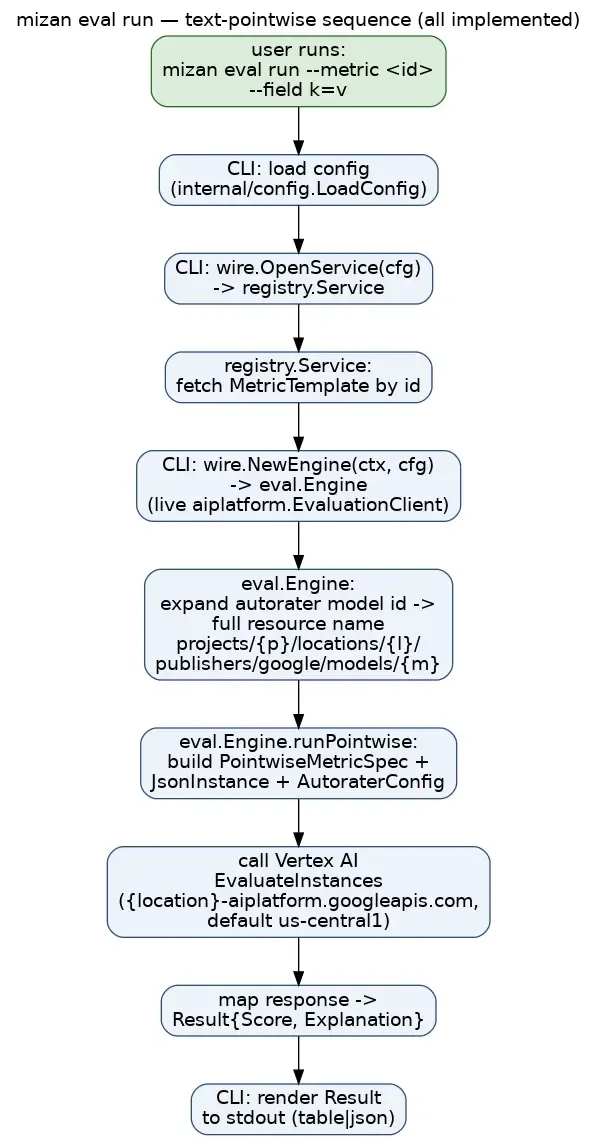
$ mizan eval run --metric demo/conciseness --field response="The cat sat on the mat."Score: 1Explanation: The response 'The cat sat on the mat.' is a very short, direct, and grammatically complete sentence that conveys its meaning with no superfluous words, making it maximally concise.This is a live call to Vertex AI’s EvaluateInstances API in the
configured region (us-central1 by default). --field key=value is treated
as plain text; for image/audio/video/music assets, use --file key=/path
(local file, auto-staged to your configured GCS staging bucket) or --gcs key=gs://... (a pre-staged asset) instead — see
docs/testing-guide.md for a full multimodal
walkthrough.
Choosing the judge model — and global-only judges
Section titled “Choosing the judge model — and global-only judges”The autorater model is resolved per run: --model flag > template model >
default-model config (MIZAN_DEFAULT_MODEL) > built-in gemini-2.5-flash.
Some newer judges — the gemini-3.5 family (gemini-3.5-flash /
-flash-lite) — are global-only: they exist only on Vertex’s global eval
host and return NOT_FOUND on a regional endpoint. You do not need to change
--location to use one. When the resolved judge is global-only, Mizan
automatically runs the whole eval call against the global host
(aiplatform.googleapis.com / locations/global) — either up front for a known
global-only model, or by transparently retrying on the global host after the
regional call reports the autorater is not found.
Because a global-only judge cannot run in your region, this routing is forced:
your configured --location / MIZAN_LOCATION is kept for output labeling but
is not honored as a residency region for that run. Mizan says so on stderr, e.g.:
mizan: autorater gemini-3.5-flash is global-only (…); routing this eval to the GLOBAL host (location=global). Your configured --location is kept for labeling only.The pre-flight echo Mizan prints to stderr before each call also shows
location=global (src=global-route) for a known global-only judge — the
global-route source makes clear the global location came from this forced
routing, not from a fully-qualified model resource (which would read src=model).
The built-in default (gemini-2.5-flash) is served on both
regional and global endpoints, so a default run is never re-routed. For the full
detection details see
docs/llm-as-judge-scenarios.md Scenario 7.
Interpreting the result
Section titled “Interpreting the result”Scoreis a float. Its range and meaning are whatever your prompt’s rubric implies — Mizan does not impose a fixed scale (in the example above, the prompt asked for 0–1, so 1 means “very concise”). Read your own prompt template to know how to interpret the number it produces.Explanationis free-text rationale generated by the autorater model, not a fixed-format field — treat it as a qualitative aid, not something to parse programmatically.
Run stats (--stats)
Section titled “Run stats (--stats)”Add --stats to eval run for a per-run footer with two pieces of operational
data:
- Duration — wall-clock time for the run, always measured and shown for every path.
- Tokens —
prompt/candidates/totaltoken usage, available only on the genai path (acustom_schematemplate, or any run with--rubric-detail). The nativeEvaluateInstancespath returns no usage metadata, so there--statsprintstoken usage not available on this path (native EvaluateInstances returns no usage)rather than showing zeros.
In -o json, the same data appears as a "Stats" object — always a
"duration_ns", plus a nested "token_usage" (prompt_tokens /
candidates_tokens / total_tokens) on the genai path. See
docs/llm-as-judge-scenarios.md Scenario 8 for the
fuller narrative, including how --stats pairs with the always-on pre-flight
target echo.
Eval results store (results list / results show)
Section titled “Eval results store (results list / results show)”Every successful mizan eval run and mizan eval pairwise persists its result
to a local store by default — you get run history for free, no flag required.
Persistence is deliberately non-fatal: if the store cannot be opened or the
write fails, Mizan prints a warning: to stderr and the eval still renders its
result and exits 0. An eval is never failed because the results store hiccuped.
Opting out (--no-store)
Section titled “Opting out (--no-store)”Add --no-store to a single eval run/eval pairwise invocation to skip
persistence for that one-off run:
mizan eval run --metric demo/quality --field response="…" --no-storePrivacy: what a stored result records
Section titled “Privacy: what a stored result records”Each persisted result records the machine hostname (os.Hostname()) inline as a
coarse, non-PII-intended team-attribution label (design §4.2) — it is captured so
runs can later be told apart by originating machine, not to identify a person.
Persistence is on by default and --no-store disables it entirely.
For a narrower opt-out, add --no-host-label to a single eval run/eval pairwise invocation to suppress just the hostname: the result is still stored
normally, but its host label is recorded empty.
mizan eval run --metric demo/quality --field response="…" --no-host-labelThis matters most once the store becomes syncable or shareable; Phase 1 is local-only SQLite.
Where results are stored (config keys)
Section titled “Where results are stored (config keys)”Backend selection is config-driven (same shape as the registry store), via the
usual precedence (--flag/env MIZAN_* > .env > config default):
| Config key | Env var | Default | Meaning |
|---|---|---|---|
results-backend |
MIZAN_RESULTS_BACKEND |
sqlite |
store backend. Phase 1 ships sqlite; firestore is a later phase and currently returns a clear “not implemented” error (surfaced as a non-fatal persistence warning). |
results-db |
MIZAN_RESULTS_DB |
<UserConfigDir>/mizan/results.db |
SQLite database path. |
results-retention |
MIZAN_RESULTS_RETENTION |
hybrid |
per-input retention policy: hybrid (text inline, media by hash+URI reference), inline (everything inline), or reference (hash+reference only). The content hash is stored regardless. |
The results database is a separate file from registry.db; it is created on
first write and needs no migration.
Listing results (mizan results list)
Section titled “Listing results (mizan results list)”mizan results list [--metric <id>] [--namespace <ns>] [--tag <tag>]... [--since <t>] [--limit N] [-o table|json]--metricfilters by exact template id (<namespace>/<slug>).--namespacefilters by the id namespace.--tagfilters to results whose template currently carries the given tag(s). It is repeatable, AND-narrowing, and case-sensitive exact match — identical semantics toregistry list --tag(--tag quality --tag safetymatches only templates carrying both tags;--tag Qualitydoes not match aqualitytag).--sinceaccepts an RFC3339 timestamp (2026-08-17T12:00:00Z) or a bareYYYY-MM-DDdate (midnight UTC).--limitcaps the number of rows (0 = backend default).
--metric and --tag select templates by two different mechanisms (an exact id
vs a current-tags registry join) and cannot be combined — doing so is an
explicit error (--metric and --tag cannot be combined).
Results are returned newest-first. The table shows the run id, run time,
metric@version, the outcome (score or pairwise choice), and the resolved model.
-o json emits the whole []Result; an empty set prints a friendly note on
stderr (table) or [] (json).
How --tag works: a registry→results join
Section titled “How --tag works: a registry→results join”The results store does not persist tags — each stored result is an immutable,
point-in-time provenance record, and a template’s tags change over time, so a tag
copied onto an old row would be stale and misleading. --tag is therefore a
registry→results join, not a store filter:
- The tag set is resolved to template ids against the registry’s current
tags (the same filter as
registry list --tag). - Results are queried per matching template id and merged.
--since/--limitare applied after the merge, newest-first (so--limitcaps the combined set, not each template independently).
Because resolution uses current tags, results list --tag X returns runs for
all templates that carry X today — even results recorded before the tag was
added, and never results for a template from which X has since been removed.
If no template currently carries the tag set, the join resolves to nothing and
the usual “no results found” note is printed.
# every stored run for any template currently tagged "brand" (newest first)$ mizan results list --tag brandRUN ID RUN AT METRIC OUTCOME MODEL01M06J2X4HY7TDXBW2TKX0XZRQ 2026-08-17T00:30:44Z demo/quality@1.0.0 5 gemini-2.5-proInspecting one result (mizan results show <run-id>)
Section titled “Inspecting one result (mizan results show <run-id>)”mizan results show <run-id> [-o table|json]show renders the full, self-describing provenance of one run:
- Template ref — id, version, and contentHash (the RFC-0001 exact-version anchor).
- Applied autorater — the resolved model actually used, model source,
effective host (
regional/global), location, sampling count, and flip flag — not the template’s declared value, but what actually ran. - Rubric ref (rubric templates only) — the rubric method and scale (see the provenance note below).
- Inputs — per field: modality, retention mode, content hash, and the inline value or URI reference.
- Outcome — score/choice, explanation, warnings, duration, and (genai path) token usage.
An unknown run id fails with a crisp no result with run id "…" error and a
non-zero exit. -o json emits the whole Result.
Judge- and input-derived text is sanitized (ANSI escapes and control
characters stripped) before it is written to a terminal cell, exactly as in the
eval renderer.
What the store records — and what it faithfully leaves empty
Section titled “What the store records — and what it faithfully leaves empty”The results store records the applied template exactly as Mizan has it at run time; it never synthesizes missing data. Two consequences are worth calling out:
contentHashon locally-authored templates. The registry computes a template’scontentHashon import/fork (the pack round-trip), not onregistry create. A template you created locally therefore has an emptycontentHash, and the results store records it as empty — faithfully. Run the same template after an export→import (or import a pack) and thecontentHashis populated and flows through toresults showunchanged. Treat an emptycontentHashon a create-only template as expected, not a defect.- Rubric provenance / scale. As of the SQLite v2 migration, the registry
round-trips rubric provenance (
rubricProvenance/rubricDetailscale), and the results store reads it: for a rubric result,RubricRef.Methodreflects the template’s recorded method (e.g.adaptive-generatedfor an adaptive-generated template, withGeneratorModel/Recipeechoed when present), and a mixed-origin union-before-freeze draft additionally surfaces the distinct per-criterion origins underRubric Origins. A hand-authored template (no provenance) still showsMethod: authored, and a template with no declared scale readsRubric Scale: (not recorded)— the store neither invents a scale nor a non-authored method; it records what the template carries. Note that only templates whose provenance/scale was persisted (e.g. an adaptive rubric frozen via--save-as, or any pack import) carry these fields; a template with none records them empty. Treat an empty rubric scale as valid.
Aggregating results (results summary / results trend)
Section titled “Aggregating results (results summary / results trend)”Once you have a history of runs in the store, two read-only verbs roll them
up. Both compute their statistics in Go over results the store returns — they
never write, add columns, or migrate anything, and they depend only on the
results service façade (plus the registry service for --tag), so they behave
identically the day a non-SQLite backend lands.
Both aggregate over eval run / eval pairwise results (the runs the store
persists today). See Scope and honest gaps below for what is deliberately
not aggregated.
results summary — per-template rollup
Section titled “results summary — per-template rollup”mizan results summary [--metric <id> | --tag <T>...] [--namespace <ns>] \ [--since <t>] [--until <t>] [--limit N] [--threshold X] [-o table|json]Groups results by template (id + version) and reports, per template:
- n — the number of scored results feeding the statistics.
- n_unscored — results with no score (a genai error left
Scoreempty, or a pairwise result carries a choice, not a score). These are excluded from every statistic and counted here separately — they never skew a mean. - mean / min / max / stddev — over the scored results (
stddevis the population standard deviation). A template whose results are all unscored reports-for these (no synthesized zero).
Flags:
| Flag | Meaning |
|---|---|
--metric <id> |
aggregate one exact template id (<ns>/<slug>). |
--tag <T>... |
aggregate over all templates currently carrying all the given tags (repeatable, AND-narrowing, case-sensitive) via the registry→results join (see results list --tag). Mutually exclusive with --metric. |
--namespace <ns> |
narrow to a template-id namespace. |
--since / --until |
bound the run time (RFC3339 or YYYY-MM-DD; --until is inclusive). |
--limit N |
cap how many results are aggregated (0 = backend default). |
--threshold X |
additionally report pass / fail / passRate. A result passes when its score is ≥ X. |
$ mizan results summary --tag brand --threshold 0.8METRIC N UNSCORED MEAN MIN MAX STDDEV PASS FAIL PASS%brand-a/quality@1.0.0 12 1 0.86 0.60 1.00 0.11 9 3 75.0%brand-b/tone@1.0.0 8 0 0.79 0.55 0.95 0.13 5 3 62.5%-o json emits the full []TemplateSummary, including an optional
score-distribution histogram (buckets) not shown in the table.
results trend — score over time
Section titled “results trend — score over time”mizan results trend --metric <id> [--bucket day|week] [--per-criterion] \ [--since <t>] [--until <t>] [-o table|json]Buckets one template’s results by time and reports the mean score per bucket
(chronological order). --metric is required. Unscored results are excluded from
each bucket’s mean and counted as n_unscored.
| Flag | Meaning |
|---|---|
--bucket day|week |
bucket granularity (default day). Weeks are keyed by the UTC Monday that starts the ISO week. |
--per-criterion |
additionally report the per-criterion mean per bucket, parsed from the persisted --rubric-detail CustomOutput (see below). |
--since / --until |
bound the run time (RFC3339 or YYYY-MM-DD). |
$ mizan results trend --metric brand-a/quality --bucket week --per-criterionBUCKET N UNSCORED MEAN2026-09-07 5 0 0.81 tone/warmth 5 0.78 tone/clarity 5 0.842026-09-14 7 1 0.88 tone/warmth 7 0.90 tone/clarity 7 0.86Per-criterion means are available only for rubric-detail results — those a
eval … --rubric-detail run persisted with a per_criterion block in
CustomOutput. Buckets without that data simply omit the per-criterion rows.
Scope and honest gaps
Section titled “Scope and honest gaps”These are deliberate boundaries of v1 (per the approved design), not defects — the commands never fabricate data to fill them:
- No per-eval-set (scorecard) aggregation. Eval-set runs (
eval run --set) are not persisted to the results store today, so there are no scorecard rows to aggregate. Per-eval-set pass/fail rate is blocked on eval-set result persistence and is out of scope here.summary/trendaggregate singleeval run/eval pairwiseresults only. - No cost or token trend. Cost is not persisted, and the native Vertex
EvaluateInstancespath returns no token usage, so trend reports score only. Token usage exists only on the genai/custom-schema path and is not trended in v1. - No static HTML report.
summary/trendare CLI verbs (-o table|json); there is no--htmlreport in v1.
Per-criterion rubric detail (--rubric-detail)
Section titled “Per-criterion rubric detail (--rubric-detail)”For a rubric template, add --rubric-detail to eval run to get a score and
rationale for each authored criterion (plus an overall roll-up), instead of a
single score. Set the Likert scale with --rubric-scale "<min>-<max>" (default
1-5; non-negative, min < max). See
docs/llm-as-judge-scenarios.md Scenario 4 for the
full walkthrough and output shape.
The judge’s returned criteria are strictly reconciled against your authored set, matched by the exact (group, criterion) pair:
- a missing authored criterion (authored but not returned by the judge) fails
the run with an
eval:error naming the missing pair(s) — a partial scorecard is never surfaced; - a duplicated authored criterion (the same pair returned more than once)
fails the run with an
eval:error naming the duplicated pair(s); - an extra criterion (returned but not authored) is kept in the output and a warning is printed to stderr — extras are informative, not corrupting, so they do not fail the run.
Adaptive rubrics (authoring aid)
Section titled “Adaptive rubrics (authoring aid)”Mizan can draft rubric criteria for you from a sample prompt, using Vertex AI’s
adaptive rubric generation. This is an authoring aid, not a new kind of metric:
Gemini proposes the criteria, you review and edit them, and once you freeze them
the result is an ordinary, reproducible static rubric template — the same
kind you would author by hand, run through the same deterministic eval path. There
is no ephemeral per-prompt metric: nothing generated is treated as a hidden or
one-off rubric.
Both entry points below are built on the same generation + conversion primitives; they differ only in where the generated rubric goes.
Draft a reusable rubric template (mizan rubric generate)
Section titled “Draft a reusable rubric template (mizan rubric generate)”Generate criteria from a representative prompt and write a draft template YAML
for review. This writes nothing to the registry (create the output directory
first — rubric generate does not mkdir -p its --out path for you):
mkdir -p draftsmizan rubric generate \ --sample "Write a concise product description for a wireless mouse." \ --id acme/product-copy \ --out drafts/product-copy.yamlIt prints the proposed criteria (GROUP / CRITERION / TYPE / IMPORTANCE)
and writes the draft to --out. The draft is a plain template YAML on disk, not
a registry entry. The draft already carries a rubricProvenance block recording
how it was drafted (grep -A8 rubricProvenance drafts/product-copy.yaml to see
it); Generation provenance below
covers the field in full.
To bring the reviewed draft into the registry, wrap it in a pack and import the
pack. registry import reads a pack tree — a mizan-pack.yaml manifest plus
a templates/ directory — not a loose template file (registry import drafts/product-copy.yaml errors with source "…" is not a directory, and
importing the containing drafts/ finds nothing: 0 inserted … 0 forked).
registry create has no whole-template input either, so neither ingests the
draft on its own:
mizan pack init packs/acme --name acmecp drafts/product-copy.yaml packs/acme/templates/product-copy.yaml # after you review/edit itmizan registry import packs/acme # -> 1 inserted: acme/product-copyOnce imported it is an ordinary registry entry. The generated template declares
prompt and response inputs, so run it like any other template:
mizan eval run --metric acme/product-copy \ --field prompt="…" --field response="…"If you don’t want to keep a reviewed draft file, the mizan eval adaptive … --save-as path below freezes the generated rubric straight into the registry in
one step — no draft file and no pack needed.
Useful flags: --recipe <name> (the predefined generation recipe, default
general_quality_v1), --group-name <key> (the rubricGroups key; defaults to
the recipe family name), and --name (a human-readable template name).
--recipe accepts one of the three predefined recipes confirmed live:
general_quality_v1 (default), instruction_following_v1, and
text_quality_v1. An unrecognized value (a typo, or a recipe the API cannot
serve) is rejected locally with an error listing the valid values, so you
don’t pay for a failed generation round-trip to discover it was wrong. If you
need to pass a recipe not on this list — for example a new version the Vertex
API enables before Mizan curates it — set MIZAN_ALLOW_CUSTOM_RECIPE=1 to relax
the check to a bare-token format check. This applies to both rubric generate
and eval adaptive.
Generate-and-score in one step (mizan eval adaptive)
Section titled “Generate-and-score in one step (mizan eval adaptive)”Generate criteria from a prompt and immediately score a response against them. The generated rubric is held in memory and is never persisted unless you ask for it:
mizan eval adaptive \ --prompt "Write a concise product description for a wireless mouse." \ --response "The Acme M1 is a wireless mouse."This runs through the ordinary rubric eval path, so --rubric-detail
(and --rubric-scale), --model, --stats, and --project all behave exactly
as they do on eval run. The proposed criteria are echoed to stderr for
transparency (so --output json on stdout stays a single clean object).
Add --save-as <namespace>/<slug> to freeze the generated rubric into the
registry as an ordinary reproducible static template you can rerun later:
mizan eval adaptive --prompt "…" --response "…" --save-as acme/product-copymizan eval run --metric acme/product-copy --field prompt="…" --field response="…"Saving fails if the id already exists — freezing never silently overwrites an existing template.
The frozen template is stored with its rubricProvenance intact in the default
registry backend, so registry get acme/product-copy -o json shows the same
provenance block, and any later eval run --metric acme/product-copy runs a
fully auditable, reproducible rubric — no draft file or pack round-trip required.
Generation provenance (rubricProvenance)
Section titled “Generation provenance (rubricProvenance)”Every rubric Mizan drafts — whether written by rubric generate or frozen by
eval adaptive --save-as — carries a rubricProvenance block that records that,
and how, the criteria were AI-drafted. A hand-authored template simply omits the
field, so you can always tell the two apart.
spec: kind: rubric rubricGroups: general_quality: - Answers the question directly - Is free of jargon rubricProvenance: method: adaptive-generated # how it was produced generatorModel: gemini-2.5-flash # the drafting model recipe: general_quality_v1 # the pinned generation recipe sampleInputRef: 'inline:"…" sha256:…' # bounded ref + SHA-256 of the sample generatedAt: 2026-08-16T12:00:00Z # RFC3339 timestamp apiVersion: v1beta1:generateInstanceRubrics rubricMeta: # per-criterion type/importance (audit) - {group: general_quality, criterion: Answers the question directly, type: CONTENT, importance: HIGH} - {group: general_quality, criterion: Is free of jargon, type: STYLE, importance: MEDIUM}sampleInputRef stores a bounded preview plus the SHA-256 of the full sample
input — never an unbounded prompt blob. rubricMeta preserves the API’s original
per-criterion type/importance for audit while rubricGroups stays a plain
list, so the runnable rubric is unchanged.
rubricProvenance is part of the template’s content hash: editing the criteria
or the provenance changes the hash, which is what makes an AI-drafted rubric
auditable. The field is optional and purely additive — existing hand-authored
templates and packs are unaffected.
Provenance survives both authoring paths, all the way into the registry. The
CUJ 7 path (rubric generate → wrap in a pack → registry import) carries the
block through the pack YAML and into the registry; the CUJ 8 path (eval adaptive --save-as) freezes it straight into the registry. Either way, registry get <id> -o json returns the rubricProvenance block and the ContentHash for the exact
frozen rubric, and a pack export re-emits the same block — so an AI-drafted rubric
stays distinguishable, auditable, and reproducible no matter how it was frozen.
Running an eval-set (eval run --set)
Section titled “Running an eval-set (eval run --set)”An eval-set bundles several metric templates so you can score one asset
against all of them in a single run and get one scorecard with an aggregate
verdict. mizan eval run grows a --set flag for this — it is mutually
exclusive with --metric (supply exactly one).
In Phase 1
--setis path-based: it takes a filesystem path to an EvalSet manifest file (parsed on the spot). Resolving a set by its namespaced id from an imported packs tree is a documented fast-follow.
The worked example below lives under
docs/examples/evalset-quickstart: a small pack
with two text templates (response-helpfulness, response-conciseness) and a
2-member set that aggregates them.
1. Author a manifest and import its member templates
Section titled “1. Author a manifest and import its member templates”The set members reference metric template ids, so the templates must be in your registry before the run can resolve them. Import the example pack:
$ mizan registry import docs/examples/evalset-quickstart2 inserted, 0 updated, 0 skipped, 0 conflicted, 0 unchanged, 0 forked (source: docs/examples/evalset-quickstart) inserted: quickstart/response-conciseness inserted: quickstart/response-helpfulnessThe set manifest itself (kind: EvalSet, design §3.4a) lists the members, their
weights, and how to aggregate:
apiVersion: mizan.dev/v1alpha1kind: EvalSetmetadata: id: quickstart/answer-quality version: 1.0.0 assetClass: text-answerspec: inputs: # shared inputs, passed by identity to every member prompt: prompt response: response members: - metric: quickstart/response-helpfulness weight: 2 - metric: quickstart/response-conciseness weight: 1 aggregation: method: weighted-mean # mean | weighted-mean | min threshold: 3.0 # scores are on the judge's 1-5 scale gate: false # opt-in; see the gate section below2. Run the set and read the scorecard
Section titled “2. Run the set and read the scorecard”--field/--file/--gcs populate the shared set inputs (the same flags as a
single eval run), and --model passes through to every member:
$ mizan eval run --set docs/examples/evalset-quickstart/evalsets/answer-quality.yaml \    --field prompt="What is the capital of France?" \    --field response="The capital of France is Paris, a major European city on the Seine."EvalSet: quickstart/answer-quality (v1.0.0)  asset-class: text-answer
MEMBER                           STATUS  WEIGHT  SCORE  NOTEquickstart/response-helpfulness  ok      2       5.00quickstart/response-conciseness  ok      1       4.00
Aggregate (weighted-mean over 2 scored): 4.67   threshold: 3   PASSED
Each row is one member; the aggregate line names the method, the count of scored
members, the threshold (if any), and the always-computed verdict. Add
--output json to get the whole result — every member carries its full
eval.Result (score, explanation, stats) for machine consumers:
$ mizan eval run --set …/answer-quality.yaml --field prompt="…" --field response="…" -o json{ "SetID": "quickstart/answer-quality", "Members": [ { "MetricID": "quickstart/response-helpfulness", "Status": "OK", "Score": 5, … }, { "MetricID": "quickstart/response-conciseness", "Status": "OK", "Score": 3, … } ], "Aggregate": { "Method": "weighted-mean", "Score": 4.33, "Threshold": 3, "Passed": true, "Scored": 2 }, "Verdict": "PASSED", "Gate": false}Note: The scores in the examples above (and elsewhere in this guide) are illustrative and were captured from separate live runs. The judge model is non-deterministic, so exact per-member scores and the aggregate vary run-to-run — the table and JSON blocks here come from different invocations, which is why their conciseness score and aggregate differ. Treat the shapes, not the exact numbers, as the contract.
3. Partial failures (continue-on-error vs --fail-fast)
Section titled “3. Partial failures (continue-on-error vs --fail-fast)”By default a member that can’t resolve or errors does not abort the run — it
is recorded and the set continues, and the aggregate is computed over only the
scored members. The
answer-quality-badmember.yaml
example has a first member pointing at a template that does not exist:
$ mizan eval run --set …/answer-quality-badmember.yaml --field prompt="…" --field response="…"EvalSet: quickstart/answer-quality-badmember (v1.0.0)  asset-class: text-answer
MEMBER                           STATUS   WEIGHT  SCORE  NOTEquickstart/does-not-exist        missing  1       -      registry: template not foundquickstart/response-helpfulness  ok       2       5.00quickstart/response-conciseness  ok       1       3.00
Aggregate (weighted-mean over 2 scored): 4.33   threshold: 3   PASSED
The broken member is reported missing with the reason in the NOTE column; the
run still completes. Pass --fail-fast to abort at the first errored/missing
member instead — the remaining members are then reported skipped:
$ mizan eval run --set …/answer-quality-badmember.yaml --field … --fail-fastMEMBER                           STATUS   WEIGHT  SCORE  NOTEquickstart/does-not-exist        missing  1       -      registry: template not foundquickstart/response-helpfulness  skipped  2       -quickstart/response-conciseness  skipped  1       -
Aggregate (weighted-mean over 0 scored): -   threshold: 3   FAILED
4. The opt-in gate and exit code
Section titled “4. The opt-in gate and exit code”The scorecard always shows the PASSED/FAILED verdict. Whether a failing
set makes the process exit non-zero is opt-in: set aggregation.gate: true
in the manifest. A non-zero exit happens only when the set is a gate and
the verdict is FAILED; the concise gate error is written to stderr so
stdout stays a clean scorecard. This is how you wire an eval-set into a CI check.
With gate: true and a strict threshold the set misses
(answer-quality-strict-gate.yaml):
$ mizan eval run --set …/answer-quality-strict-gate.yaml --field prompt="…" --field response="…"…Aggregate (weighted-mean over 2 scored): 4.33 threshold: 4.9 FAILEDerror: eval-set gate failed: FAILED verdict for quickstart/answer-quality-strict-gate$ echo $?1The same failing set with gate: false
(answer-quality-strict-nogate.yaml)
still reports FAILED on the scorecard, but exits 0:
$ mizan eval run --set …/answer-quality-strict-nogate.yaml --field prompt="…" --field response="…"…Aggregate (weighted-mean over 2 scored): 4.67 threshold: 4.9 FAILED$ echo $?0From an agent. The
run-eval-setagent skill drives this exact command — locating or scaffolding the manifest, parsing theevalset.EvalSetResultscorecard, and honoring the gate exit code for CI. See Mizan Agent Skills.
Version and releases
Section titled “Version and releases”Check which build you’re running:
$ mizan versionmizan v1.2.3 (commit a1b2c3d, built 2026-08-10T00:00:00Z)Like every other command, version honors -o/--output json|table (default a
plain line) for scripting:
$ mizan version -o json{ "version": "v1.2.3", "commit": "a1b2c3d", "date": "2026-08-10T00:00:00Z"}The three values are injected at build time via -ldflags. A plain
go build ./cmd/mizan (no ldflags) reports the placeholders
dev/none/unknown; make build and make install populate them from
git describe --tags --always --dirty, the short commit, and a UTC timestamp.
Cutting a release
Section titled “Cutting a release”Releases are tag-driven. Push a vX.Y.Z tag and the
release workflow cross-compiles CGO-free
binaries (linux/darwin × amd64/arm64), stamps them with the tag via the same
ldflags, and attaches the tarballs plus .sha256 sums to the GitHub Release:
git tag v1.2.3git push origin v1.2.3Once a vX.Y.Z tag exists, downstreams (e.g. the mizan-templates
validate-packs CI) can pin MIZAN_VERSION=vX.Y.Z instead of tracking
@main.
Troubleshooting
Section titled “Troubleshooting”Error: config: project ID not set (set MIZAN_PROJECT_ID or PROJECT_ID)
eval run requires a project id. Run mizan config set project-id <id> or
export MIZAN_PROJECT_ID/PROJECT_ID. (Registry and config show work
without one.)
Error: eval: instance is missing values for template variables [...]
Your prompt template has a {{var}} placeholder with no matching --field var=value on the command line. Add the missing --field.
Error: eval: unknown instance field(s) [...] for template "<id>"; it references placeholders [...]
The reverse of the above: you supplied a --field whose key matches no
{{placeholder}} in the template — usually a typo (--field respons=... for a
{{response}} placeholder) or an extra key. Such a field would be silently
dropped and never reach the judge, so Mizan rejects it. Fix the field name to
match a placeholder, or add the placeholder to the prompt.
Error: eval: template "<id>" references no {{placeholders}} but N field(s) were supplied [...]; the value(s) will NOT reach the judge
The template’s prompt has no {{...}} placeholders at all, yet you passed
--field values. Because substitution is placeholder-driven, those values
cannot reach the judge — which previously yielded a confidently-wrong score
against an empty input. Add a {{...}} placeholder to the prompt (for example
Response: {{response}}), or check that you referenced the right template.
Note that single-brace {var} is not recognized — use double braces {{var}}.
Error: kind "rubric" requires rubric groups; pass --rubric-group "name=crit1;crit2" (repeatable) or --rubric-groups-file <path>
You ran registry create --kind rubric without either rubric-authoring flag.
This is caught immediately at create time — add
--rubric-group "name=criterion one;criterion two" (repeatable) or
--rubric-groups-file <path-to-json-object>. See
docs/testing-guide.md for a full recipe.
Error: kind "custom_schema" requires a response schema; pass --response-schema '<json>' or --response-schema-file <path>
Same as above, for --kind custom_schema: add --response-schema '<json>'
or --response-schema-file <path>. See
docs/testing-guide.md for a full recipe.
Error: eval: pairwise template "<id>" metric prompt must reference the baseline {{<name>}} and candidate {{<name>}} placeholder(s); the API rejects instance keys not present in the template
Your pairwise template’s --prompt text doesn’t contain {{<baseline-field>}}
and {{<candidate-field>}} placeholders matching the field names you passed
at create time via --baseline-field/--candidate-field. Update the prompt
to reference both. See
docs/testing-guide.md.
Compare (pairwise) flip and the Choice is authoritative
A compare run applies position-bias mitigation (“flip”) controlled by the
template’s --flip-enabled flag at create time (default true). With
flip on, the judge evaluates both position orderings and returns a de-biased,
aggregated Choice — the Choice is the authoritative verdict. The
Explanation, however, is a single sampled artifact whose
“baseline”/“candidate” wording may reflect a flipped ordering, so it can read
as though it praises the other response. mizan eval compare /
mizan eval pairwise prints a one-line warning to stderr when flip is in
effect (and serializes it under warnings in --output json). If you need
the explanation’s wording to match the order you presented, create the template
with --flip-enabled=false; the trade-off is losing position-bias mitigation.
Because the registry stores FlipEnabled as a plain bool (no tri-state),
false is only distinguishable from the default at create time — set it
explicitly on the template.
Error: registry: template not found
The <id> you passed to get/update/delete/eval run --metric doesn’t
exist in the registry. Check mizan registry list.
Error: config: refusing custom API endpoint "...": host is not *.googleapis.com (set MIZAN_ALLOW_CUSTOM_ENDPOINT=1 to override)
You set --api-endpoint/MIZAN_API_ENDPOINT to a non-Google host. This is a
deliberate safeguard against exfiltrating your ADC token to an untrusted
endpoint. If you really need a custom endpoint (e.g. a local test proxy), set
MIZAN_ALLOW_CUSTOM_ENDPOINT=1.
Error: eval: EvaluateInstances: autorater GenerateContent was denied in project "<p>" (location "<loc>"). This is a project IAM/enablement issue, NOT a transient delay ...
The Eval Service could not invoke the autorater model’s inner GenerateContent
call in your project. Vertex’s underlying message (“If you’re using a new
project, expect a delay and retry…”, preserved in the (raw: ...) tail) is
misleading — this is not transient, so retrying will not help. It is a
project-level permission/enablement condition. To fix, in the project that runs
the eval:
- Ensure the Vertex AI API is enabled in the project.
- Grant the project’s Vertex AI Service Agent the Service Agent role. The
agent is
service-<project-number>@gcp-sa-aiplatform.iam.gserviceaccount.com; give itroles/aiplatform.serviceAgentso it can invoke the autorater model. Find the project number withgcloud projects describe <project> --format='value(projectNumber)'. If the API was only just enabled, allow a few minutes for the service agent to be provisioned. - If the metric references a
gs://asset, grant that same service agentroles/storage.objectVieweron the staging bucket so it can read the object (needed for cross-project reads, e.g.gsutil iam ch serviceAccount:service-<project-number>@gcp-sa-aiplatform.iam.gserviceaccount.com:roles/storage.objectViewer gs://<bucket>). Alternatively, run the eval in the project that owns the bucket, or stage the asset into a bucket in the eval project.
Coming soon / roadmap
Section titled “Coming soon / roadmap”Batch evaluation and the desktop app are not usable end-to-end via the CLI
in the current build — there is no eval batch and no runnable desktop app.
Don’t expect them to work. Template pack sharing is, however, available today:
registry import from a local pack tree, a git URL, or the default
templates repo (bare import), with the full reconciliation strategy set and
--namespace filtering; registry export / pack init / pack add for
authoring; and pack validate (the credential-free PR gate for MetricTemplate +
EvalSet manifests).
docs/roadmap.md is the canonical list of what is planned and
what each item would look like.
How it fits together
Section titled “How it fits together”For a single-response text eval run, the request flows entirely through
implemented code paths — see the sequence below. This is one example of a
fully implemented path; rubric, custom_schema, compare, and multimodal are
also implemented end-to-end (see
architecture-final.md §6 for the domain model and
the component diagram):