Worked example
This page walks through a single, concrete flow: an AI coding agent, driven by
the a2acli skill, discovers an
agent, finds a skill on its card, and invokes it — all deterministically, with
--output json. It adapts Scenario E (day-to-day CLI operation) from the
repository’s Agent Skills Guide.
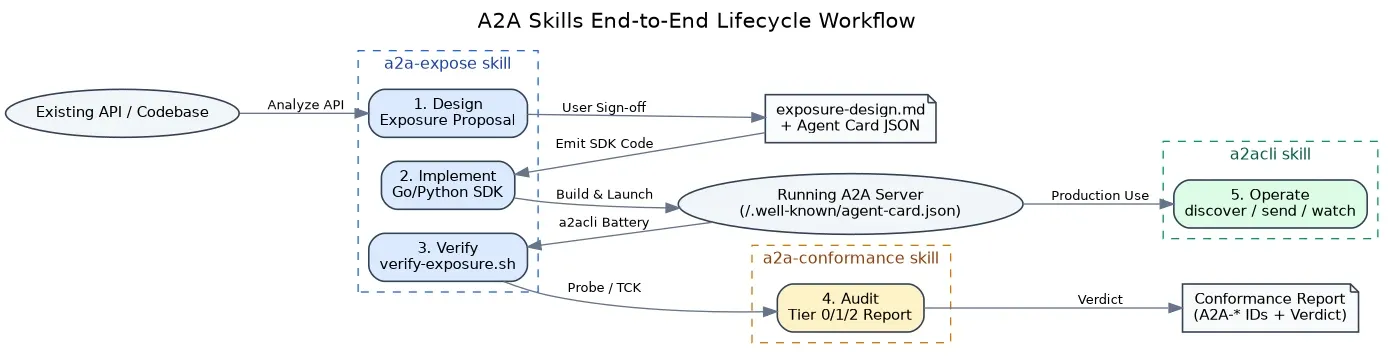
The three skills compose across the lifecycle; this example is the “production operation” stage on the right of the workflow:
The prompt the agent receives
Section titled “The prompt the agent receives”“Discover the skills on
http://localhost:9001and run the summarize skill on this text.”
This matches the a2acli skill’s trigger keywords, so the agent activates it and
follows its Critical Rules.
The flow
Section titled “The flow”-
Preflight the binary
Section titled “Preflight the binary”The skill requires
a2aclionPATH, so the agent checks it first:Terminal window a2acli versionIf this fails, the agent installs the binary or stops cleanly — it does not guess. See Installation.
-
Discover the agent (
Section titled “Discover the agent (--output json)”--output json)The agent fetches the AgentCard as machine-readable JSON — never the TUI:
Terminal window a2acli discover --service-url http://localhost:9001 --output jsonIt reads the
skillsarray to confirm asummarizeskill exists:{"name": "Example Agent","skills": [{ "id": "summarize", "name": "Summarize", "description": "Summarize text" }]}See Discovery & Identity for the full card shape.
-
Send the task (blocking,
Section titled “Send the task (blocking, --output json)”--output json)sendblocks by default and returns a single JSON document once the task reaches a terminal state — the agent adds no--waitand no--stream:Terminal window a2acli send "Summarize this text: ..." \--service-url http://localhost:9001 \--skill summarize \--output json -
Read
Section titled “Read status.state, then the artifacts”status.state, then the artifactsThe agent inspects
status.stateto branch on success or failure, then reads the produced artifacts:{"id": "task-abc123","status": { "state": "TASK_STATE_COMPLETED" },"artifacts": [{"name": "summary","parts": [{ "text": "A concise summary of the input text." }]}]}TASK_STATE_COMPLETED→ readartifactsand return the result.TASK_STATE_FAILED→ surface the failure; the error envelope (on stdout) carrieserror.code,error.message, anderror.hint.
The process exit code confirms the outcome for scripting:
0success,2usage error,1any other failure.
Why each rule matters here
Section titled “Why each rule matters here”Authenticated variant
Section titled “Authenticated variant”Against an OAuth 2.1-protected agent, the agent logs in once (a human completes the browser flow), after which every command reuses the stored token automatically:
# One-time interactive logina2acli auth login --service-url https://agent.example.com
# Subsequent commands auto-authenticate — no --token neededa2acli send "Summarize this text: ..." \  --service-url https://agent.example.com \  --skill summarize \  --output json
For a fully non-interactive runtime, the agent retrieves the stored token and passes it explicitly:
TOKEN=$(a2acli auth token --service-url https://agent.example.com)a2acli send "Summarize this text: ..." \ --service-url https://agent.example.com \ --token "$TOKEN" \ --output jsonSee Configuration & Auth for the full auth workflow.
Related
Section titled “Related”- Skills reference → a2acli
- Messaging & Tasks — every flag for
sendandget. - Direct-usage tutorial — the same commands, run by a human.