Direct-usage tutorial
This is the hands-on walkthrough for Audience A — humans driving a2acli
from a terminal. You will stand up a local mock agent, discover it, send it
messages (blocking and streaming), track and download a task, then repoint the
exact same commands at a real agent and save it as a named environment.
Everything below is a single, ordered loop. Each command maps to a step in the A2A task lifecycle:
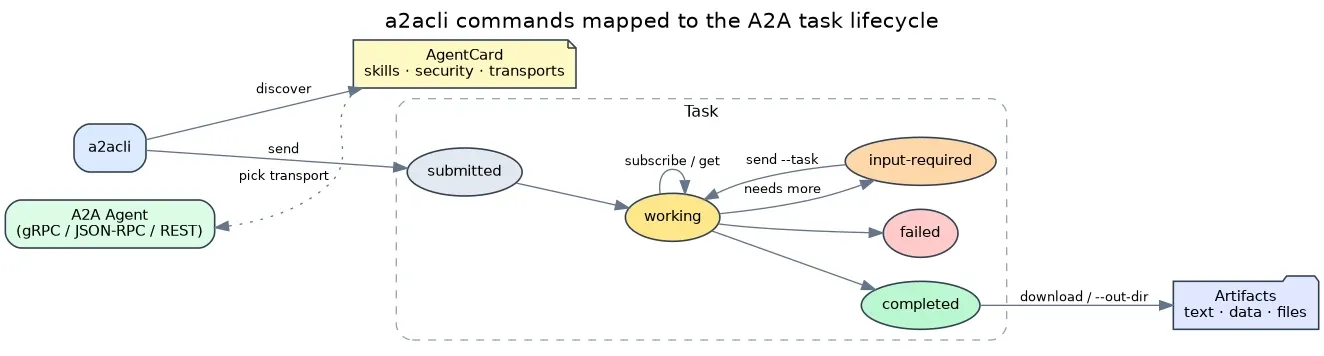
The local loop
Section titled “The local loop”-
Verify your install
Section titled “Verify your install”Every session — and every script or agent — should start with a preflight check that the binary is present and runnable:
Terminal window a2acli versiona2acli version v1.10.2commit: cee0791built at: 2026-09-18T20:57:37ZIf this fails, install the CLI first — see Installation.
-
Start a local mock agent
Section titled “Start a local mock agent”a2acli serve --echospins up a local, A2A-compliant echo agent — an agent that returns your message straight back as an artifact. It is the fastest way to exercise the whole client without a real backend. Run it in its own terminal (or background it with&):Terminal window a2acli serve --echo --port 9001The server binds to
127.0.0.1:9001by default. Leave it running and open a second terminal for the commands that follow.--echois the only mock mode available today; see Serving & Mocking. -
Discover the agent
Section titled “Discover the agent”Before sending anything, fetch the agent’s AgentCard — its identity, supported transports, skills, and security requirements:
Terminal window a2acli discover -u http://localhost:9001Agent: a2acli-mock-agentVersion: 1.0.0Description: A simple echo agent spun up via a2acliSupported Bindings: HTTP+JSONCapabilities: [Streaming: true]card getis a noun-verb alias ofdiscover, and--extendedfetches the richer, authenticated card (viaGetExtendedAgentCard) when the agent offers one:Terminal window a2acli card get -u http://localhost:9001 # same as discovera2acli discover -u http://localhost:9001 --extendedSee Discovery & Identity for the full AgentCard fields.
-
Send a message (blocking)
Section titled “Send a message (blocking)”sendinitiates a task. By default it blocks until the task reaches a terminal or interrupted state, then prints a single result document:Terminal window a2acli send "Hello, agent!" -u http://localhost:9001Task Status: [TASK_STATE_COMPLETED]--- 1 ARTIFACT(S) AVAILABLE ---Name: part-0-textContent (Preview):Hello, agent!------------------------------Task ID: 01a0b653-0d08-7821-9702-e80827c03b3eContext ID: 01a0b653-0d08-787c-ab61-ea097a73d77fNote the Task ID and Context ID in the output — you will use the Task ID to track and download the task, and the Context ID to continue the conversation. Blocking is the right default for scripts and one-shot calls: one command in, one result out.
-
Stream live updates
Section titled “Stream live updates”To watch events as they arrive instead of waiting for the final document, opt in with
--stream. Streaming is caller-controlled and never inferred from configuration, environment, or terminal detection (SPEC §11.3):Terminal window a2acli send "Hello, agent!" -u http://localhost:9001 --stream -o jsonIn
-o jsonmode,--streamemits a JSONL event stream — one JSON object per line, tracing the task through its states:{"id":"01a0…a5e9","contextId":"01a0…3b80","status":{"state":"TASK_STATE_SUBMITTED"},"history":[…]}{"taskId":"01a0…a5e9","status":{"state":"TASK_STATE_WORKING","timestamp":"2026-09-18T21:01:31Z"}}{"taskId":"01a0…a5e9","artifact":{"artifactId":"01a0…bc43","name":"part-0-text","parts":[{"text":"Hello, agent!"}]},"lastChunk":true}{"taskId":"01a0…a5e9","status":{"state":"TASK_STATE_COMPLETED","timestamp":"2026-09-18T21:01:31Z"}}Contrast the two:
One request, one single JSON document with the final task state and its artifacts. Best for scripts and deterministic automation.
Terminal window a2acli send "Hello, agent!" -u http://localhost:9001 -o jsonA JSONL stream of incremental status and artifact events, ending in a terminal state. Best for watching long-running tasks live.
Terminal window a2acli send "Hello, agent!" -u http://localhost:9001 --stream -o json -
Get machine-readable output
Section titled “Get machine-readable output”Add
-o json(or its shorthand-n/--no-tui) to any command to get the scripting- and agent-friendly form. In blockingsend, the result is a single document whosestatus.stateis the field to key decisions on:Terminal window a2acli send "Hello, agent!" -u http://localhost:9001 -o jsonThe sample below is abridged — long IDs are elided with
…, and the full document also carries ahistoryarray of the conversation’s prior messages, omitted here for brevity:{"task": {"id": "01a0b653-0d08-7821-9702-e80827c03b3e","contextId": "01a0b653-0d08-787c-ab61-ea097a73d77f","artifacts": [{ "artifactId": "01a0…97a63", "name": "part-0-text","parts": [{ "text": "Hello, agent!" }] }],"status": { "state": "TASK_STATE_COMPLETED","timestamp": "2026-09-18T21:01:31Z" }}}On failure,
-o jsonmode prints the A2A CLI error envelope to stdout (human diagnostics stay on stderr), and the process exits non-zero:{ "error": {"code": "A2ACLI_ERR_UNREACHABLE","message": "failed to resolve AgentCard: … connection refused","hint": "Check --service-url or A2ACLI_SERVICE_URL","a2aCode": null} }See Command model → output modes, error envelope, and exit codes for the full contract.
-
Track a task
Section titled “Track a task”Use the Task ID from
sendto fetch a task’s current state and an artifact preview at any time:Terminal window a2acli get <taskID> -u http://localhost:9001For a task still running,
--waitpolls until it reaches a terminal or interrupted (input-required/auth-required) state, at--poll-interval(default2s), bounded by--timeout(SPEC §9.3):Terminal window a2acli get <taskID> -u http://localhost:9001 --wait --poll-interval 2s--history nincludes up to n prior conversation messages:Terminal window a2acli get <taskID> -u http://localhost:9001 --history 20 -o json -
Download artifacts
Section titled “Download artifacts”Save a completed task’s artifacts to disk with
download:Terminal window a2acli download <taskID> -u http://localhost:9001 --out-dir ./outYou can also capture artifacts at send time by passing
--out-dir(-d) directly tosend:Terminal window a2acli send "Generate a report" -u http://localhost:9001 --out-dir ./out -
List task history
Section titled “List task history”Ask the agent for the tasks it has processed. The server must support history for this to return data (the local echo mock does not):
Terminal window a2acli list tasks -u http://localhost:9001 --limit 10 --status completedFilter by
--status(submitted,working,completed,failed,canceled,rejected) or--context. See Messaging & Tasks → list tasks. -
Cancel a task
Section titled “Cancel a task”Request best-effort cancellation of an active task. It may already have completed or be in a non-cancelable state:
Terminal window a2acli cancel <taskID> -u http://localhost:9001
Graduate to a real agent
Section titled “Graduate to a real agent”The same commands work against any A2A-compliant agent — you just change the
URL. Point -u at a real endpoint:
a2acli discover -u https://agent.example.coma2acli send "Hello, agent!" -u https://agent.example.com-
Authenticate (if the agent requires it)
Section titled “Authenticate (if the agent requires it)”If the agent is OAuth-protected, log in once.
a2acliruns the OAuth 2.1 auth-code + PKCE flow and opens a browser for you to authenticate:Terminal window a2acli auth login -u https://agent.example.comThe token is stored under
~/.config/a2acli/tokens/(mode0600) and used automatically by later commands — you do not pass it again:Terminal window a2acli send "Hello, agent!" -u https://agent.example.com # auto-authenticatedInspect or export it for scripting:
Terminal window a2acli auth status -u https://agent.example.com # is a valid token stored?a2acli auth token -u https://agent.example.com # print the stored access token -
Save an environment
Section titled “Save an environment”Rather than retyping the URL, save a named environment profile and select it with
--env(-e):Terminal window a2acli config env add prod -u https://agent.example.coma2acli send "Hello, agent!" --env prodconfig showprints the effective settings and the source each value resolved from (flag > env > config file > default), with credentials redacted:Terminal window a2acli config show --env prod
Going further (optional)
Section titled “Going further (optional)”Once the basic loop is second nature, these flags cover richer interactions.
They all attach to send and the task commands you already know.
-
Multimodal input — send files and structured data alongside (or instead of) text:
Terminal window a2acli send "Describe this image" --attach ./diagram.pnga2acli send "Process this record" --data '{"userId":42,"tier":"gold"}'a2acli send --parts '[{"text":"hi"},{"data":{"k":"v"}}]'a2acli send --json '{"role":"user","parts":[{"text":"full control"}]}'--attachand--dataare repeatable;--partsand--jsongive you full control over theMessageobject. -
Multi-turn conversations — reuse the Context ID from an earlier
sendto continue the same thread:Terminal window a2acli send "And now translate it to French" --context <contextID> -
Cross-task chaining — reference a prior task’s artifacts as input to a new, independent task (this does not continue the conversation):
Terminal window a2acli send "Summarize the attached report" --ref <priorTaskID> -
Push notifications — have the server call a webhook when a task’s state changes instead of polling (the agent must advertise
Capabilities.PushNotifications: true):Terminal window a2acli push-config create <taskID> https://myserver.example.com/notify
Related
Section titled “Related”- Messaging & Tasks — every flag for
send,get,subscribe,list tasks,cancel,download, andpush-config. - Command model — output modes, JSONL streaming, the error envelope, and exit codes.
- Configuration & Auth —
config envprofiles and the fullauthflow. - Global flags reference —
--context,--task,--ref,--transport, credentials, and--timeout.